Screenshot workflows
Annotated screenshots, process diagrams and recovery help for all four MedBuk+ roles.
Choose your role, follow the numbered controls, then check the expected result before continuing. Each workflow explains what to do when a code, save, invitation or collection result is unclear.
| Your role | Follow a workflow | Screenshots included |
|---|---|---|
| App member | Sign in, set up, record, review and find your data; collect a voucher | Web app sign-in and setup screens (5 October 2026, sample account) and existing Android/iPhone version 1.8.0 sample app captures |
| Merchant | Apply, sign in, prepare rewards, collect vouchers and run a booth scan link | Current public password/email-code screens and application steps |
| Corporate | Sign in, invite employees and review submitted leave | Current public password/email-code screens |
| Platform | Sign in, onboard workspaces and review rewards | Current public password/email-code and recovery screens |
Process diagrams
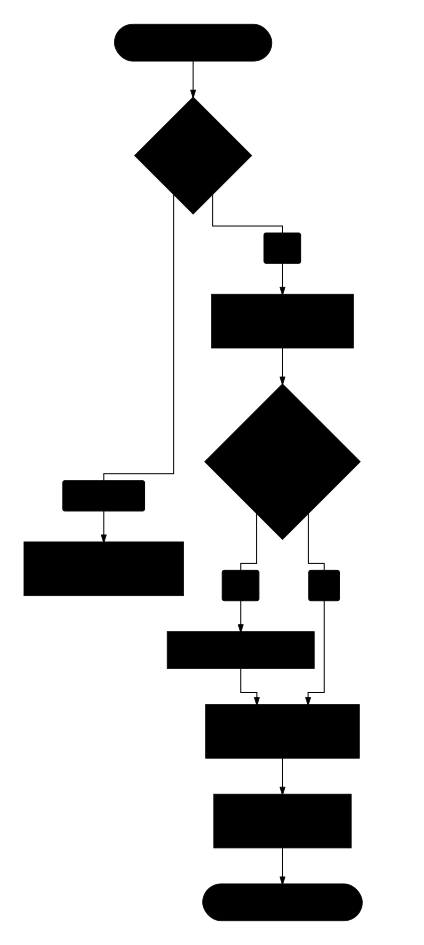
Boxes show actions, diamonds show checks, and arrow labels show the possible outcomes. Choose Open full-size diagram for a larger view or Read workflow as text to follow the same process in words. Use the diagrams alongside the numbered steps and screenshot annotations.
Read workflow as text
- Check that the invitation is live, then sign in and verify the invited inbox.
- Complete first-password setup only if the invitation asks for it, then review the workspace and role.
- Verification proves inbox possession but is separate from acceptance.
- Explicitly accept the live invitation to create workspace membership.
- If the invitation is expired, revoked or unclear, ask the inviter to review or replace it; do not assume access.
Read the annotations
Numbers on an image match the numbered explanations below it. Select a portal image to open it at full size. The screenshots explain the controls; the steps explain the order, confirmation and recovery. A displayed button is not proof an action has completed.
Screenshot coverage
Portal captures are dated 5 October 2026, taken in a browser with empty account fields. Signed-in portal task steps are described and linked to their detailed guides; their screenshots are pending an approved sample workspace. The member images reuse the existing 1.8.0 sample-data tour, rather than claiming a fresh installed-device check. Controls can differ by version, language, workspace permissions and service availability.
Private health records, invitation links, QR claims, email codes and credentials must never appear in public guide screenshots. The guides do not establish app-store release, successful email delivery or completed payment/redemption.
For every app screen, see the illustrated getting-started tour. For access and account questions, see portal access.