
Getting started with MedBuk+
Today screen
What you see when you open MedBuk+: steps, notifications, mood check-in and the Add button.
Today is the first screen after you open MedBuk+. It shows your steps for the day, your notifications, a quick mood check-in and the red Add button in the middle of the bottom bar. Everything on it is private to you.
What is on the Today screen?
Steps are read from your phone's health service and stay on your phone unless you choose to share them. Steps do not earn points. The iPhone card swipes between steps, meals, blood pressure and glucose.
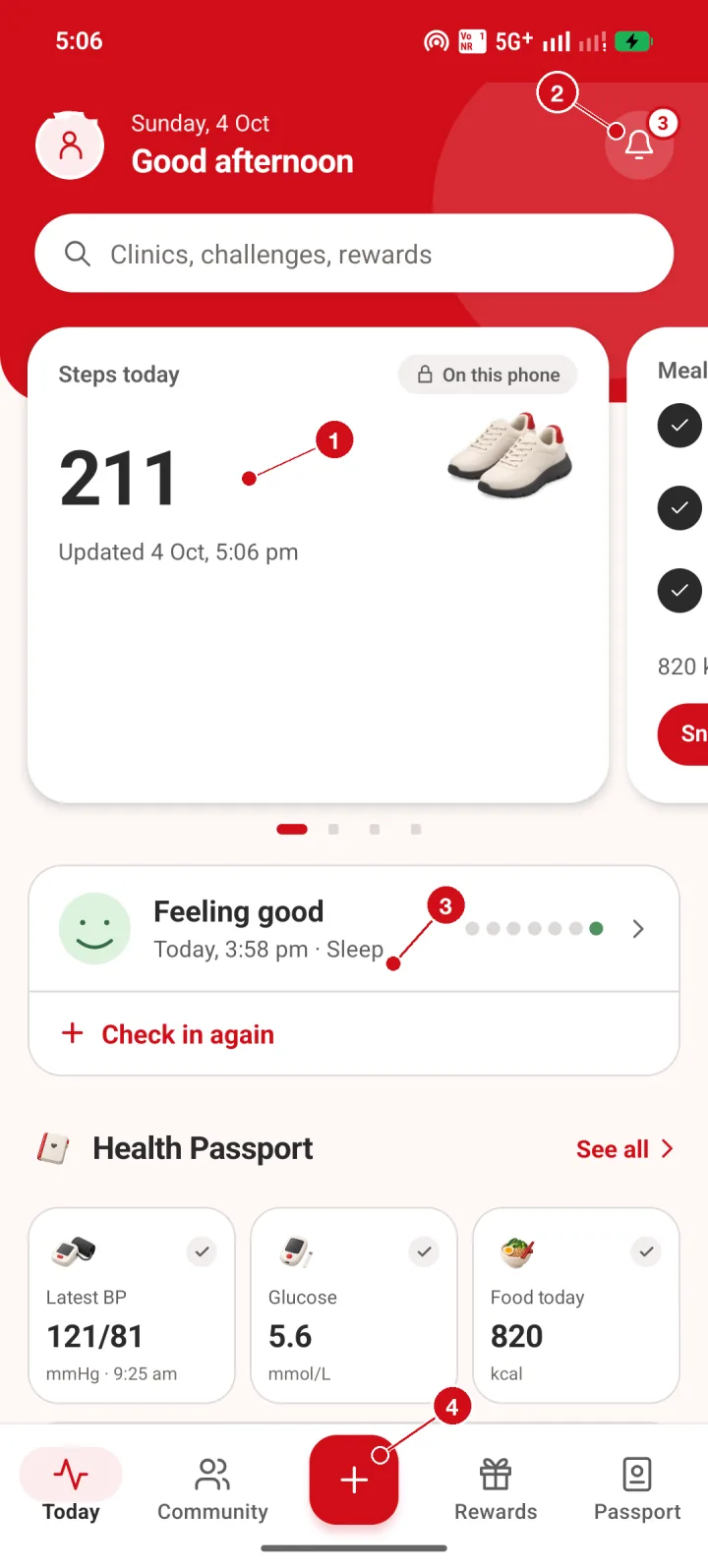
- Steps card. Today shows your steps for the day, read from your phone. Steps stay on this phone unless you choose to share them, and steps do not earn points.
- Notifications bell. The bell lists your MedBuk+ notifications. The number on it is how many you have not opened yet.
- Mood check-in. Tap Check in again to record how you feel. Your mood is private to you.
- Add button. The red + button is always in the middle of the bottom bar. Tap it to add a meal, blood pressure, glucose, weight or mood.
Next step
Tap the red Add button, then continue with logging meals and readings.